

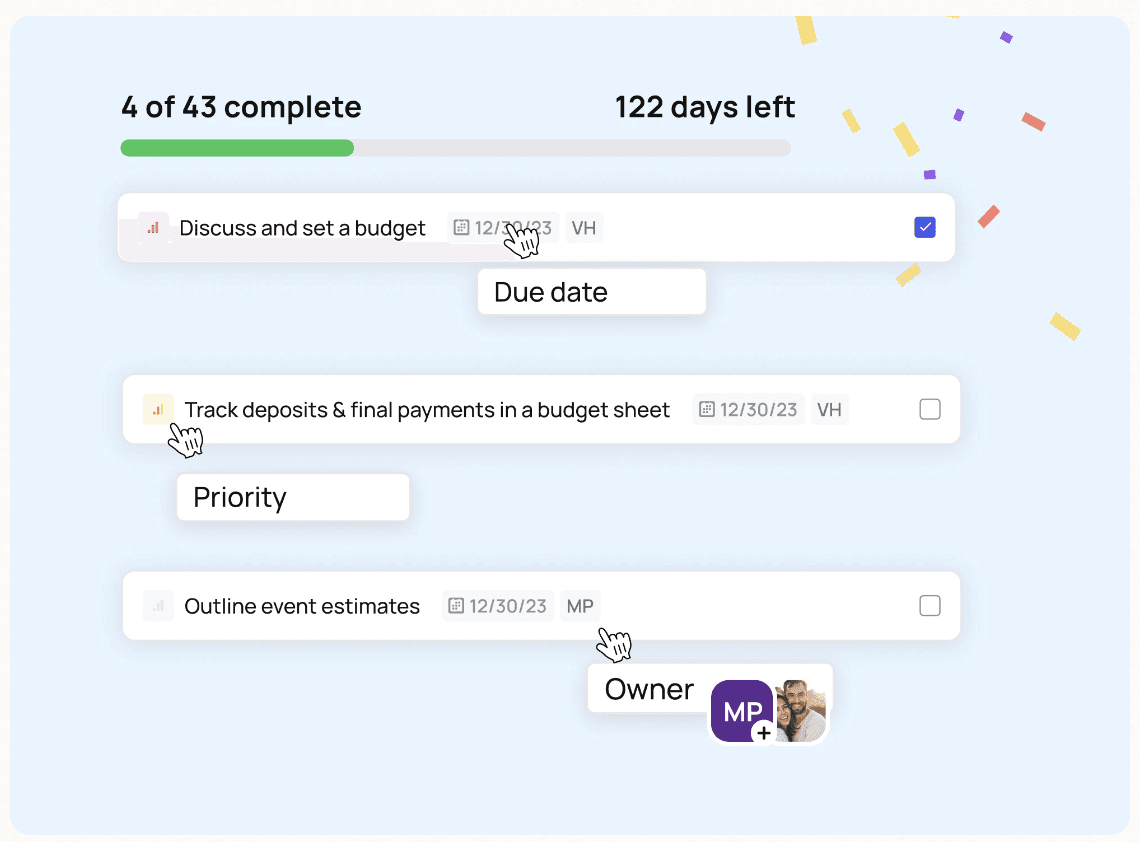



Watch To-Do Template Demo

One connected to-do list, structured, assigned, and always on track
Assign tasks with complete clarity
Start from a template, not a blank page
Use your own proven checklist or a ready-made template — including Cultural & Ethnic celebrations, Intimate Elopements and Destination weddings. Or turn an existing event's to-do list into a reusable template — due dates adjust relative to each new event's date.
Due dates calculate themselves
Pick the wedding date and every deadline works backwards from it — the twelve-month tasks, the final-month crunch and the wedding-day checklist all land where they should.
Import only what you need from templates
Choose exactly which tasks to include before importing, then refine the template wedding after wedding.

Statuses at a glance
Every task carries a status — Not Started, In Progress, Delayed or Done — so one look tells you where the event stands and when each task was last touched.
Colour-coded labels
Group and prioritise however you think: by vendor, by urgency, by phase. Labels live on your templates too, so every new wedding starts pre-organised.
Your own categories
Create to-do categories beyond the defaults — a Sangeet, a tea ceremony, a two-venue weekend — instead of forcing the celebration into a standard template.

Assign to anyone — even several people
Give each task to your team, clients or vendors, and add multiple owners when a job is genuinely shared, so nobody assumes the other person has it.
Discussion lives on the task
Add a comment, @-tag whoever needs to act, and they're notified automatically. No forwarded email chains, no version-four spreadsheet.
The full history in one place
When the couple asks what's happening with the florist, the entire history is on the task where it belongs.

Weekly reminders, automatically
Anyone with pending tasks gets a weekly reminder email listing what's still open — switch reminders on or off per event from notification settings.
Overdue flags itself
Late tasks are flagged automatically, so nothing slips quietly past its deadline.
One hub across every wedding
The Action Items view pulls every task assigned to you across all your events into one central hub — one list instead of six tabs.

Templates for every celebration
Ready-made templates cover cultural and ethnic celebrations, intimate elopements and destination weddings; custom categories handle everything the defaults don't.
Vendor checklists included
Build a wedding vendor checklist and assign each booking task straight to the vendor responsible.
Inclusive by default
Language throughout is gender-neutral, so the tool reads right for every couple you plan for. Template in, owners assigned, reminders on, done.


Create task templates
Build a structured checklist once and reuse it across events
Assign tasks & deadlines
Pre-assign responsibilities to your team, clients, or vendors
Track progress & collaborate
Statuses, weekly reminders and task comments keep everyone moving without follow-up emails


Can I create custom to-do categories beyond the defaults?
Yes. Build your own to-do categories so the list fits non-traditional weddings and multicultural celebrations, not just a standard template.
Can I assign a task to more than one team member?
Yes. Assign a task to multiple owners so shared responsibilities are clear across your team.
Can I set statuses and labels to organise tasks?
Yes. Add statuses and labels to group and prioritise tasks, and see when each was last updated.
Can I reuse a to-do template across weddings?
Yes. Save a list as a template — or turn an existing event's to-dos into one — and import it into any new wedding, so you start every event with your proven checklist. Due dates adjust relative to the new event's date.
Do ready-made wedding checklist templates come with due dates?
Yes. Templates cover styles from cultural celebrations to destination weddings, and every due date calculates automatically from the wedding date. You can also choose exactly which tasks to include before importing.
Does That's The One remind people about their tasks?
Yes. Anyone with pending tasks gets a weekly reminder email, and overdue tasks are flagged automatically. Reminders can be switched on or off per event in notification settings.
Can I see tasks across all my weddings in one place?
Yes. The Action Items view gathers every task assigned to you across all your events into one central hub, so you always know what needs doing next.
Can I import my existing checklist from a spreadsheet?
Yes. Import a CSV of to-dos straight into an event, or upload an existing checklist file and TTO's AI-assisted import turns it into structured, editable tasks. From there, save the list as a reusable template for every wedding after that.
Can I duplicate a whole event, including its to-do list?
Full event duplication isn't available yet, but you can turn an existing event's to-dos, timeline or floor plan into a reusable template — due dates adjust relative to the new event's date — so a proven event carries into the next one.