

Alojamiento organizado para tus invitados

Alojamiento organizado para tus invitados

Alojamiento organizado para tus invitados

Nuestro servicio de sitio web y alojamiento personalizado facilita a los huéspedes seleccionar y reservar su habitación en solo dos clics.

Nuestro servicio de sitio web y alojamiento personalizado facilita a los huéspedes seleccionar y reservar su habitación en solo dos clics.

Medido a escala

Medido a escala

Añadir imágenes de tablas y planos de planta y establecer dimensiones precisas para mayor tranquilidad

Añadir imágenes de tablas y planos de planta y establecer dimensiones precisas para mayor tranquilidad

Añadir invitados

Añadir invitados

Sube tu lista de invitados y sincroniza sus elecciones de comida con el plan de asientos

Sube tu lista de invitados y sincroniza sus elecciones de comida con el plan de asientos

Exportar PDF con 1 clic

Exportar PDF con 1 clic

Un documento que resume automáticamente quién está sentado dónde y qué están comiendo

Un documento que resume automáticamente quién está sentado dónde y qué están comiendo


Your client wants help with accommodation?

We can take this off your plate & help your client with two options:

Rooms already part of the venue price? We can “sell” these rooms to guests on a sleak website, where they can instantly pick and pay for their room.

Rooms already part of the venue price? We can “sell” these rooms to guests on a sleak website, where they can instantly pick and pay for their room.

One budget, fully connected

Track every cost, with total clarity

Track every cost, with total clarity

Need help securing rooms for the event? Our team will secure best available rates for guests to book and create a beautiful booking page. If it’s on booking.com, we’ve got access to it!

Need help securing rooms for the event? Our team will secure best available rates for guests to book and create a beautiful booking page. If it’s on booking.com, we’ve got access to it!


Stay on top of every payment


Stay on top of every payment


Present budgets professionally


Present budgets professionally


Present budgets professionally


Need help securing rooms for the event? Our team will secure best available rates for guests to book and create a beautiful booking page. If it’s on booking.com, we’ve got access to it!

Need help securing rooms for the event? Our team will secure best available rates for guests to book and create a beautiful booking page. If it’s on booking.com, we’ve got access to it!

A budget that builds itself from your vendors

A budget that builds itself from your vendors

Payment schedules land in the budget

Payment schedules land in the budget

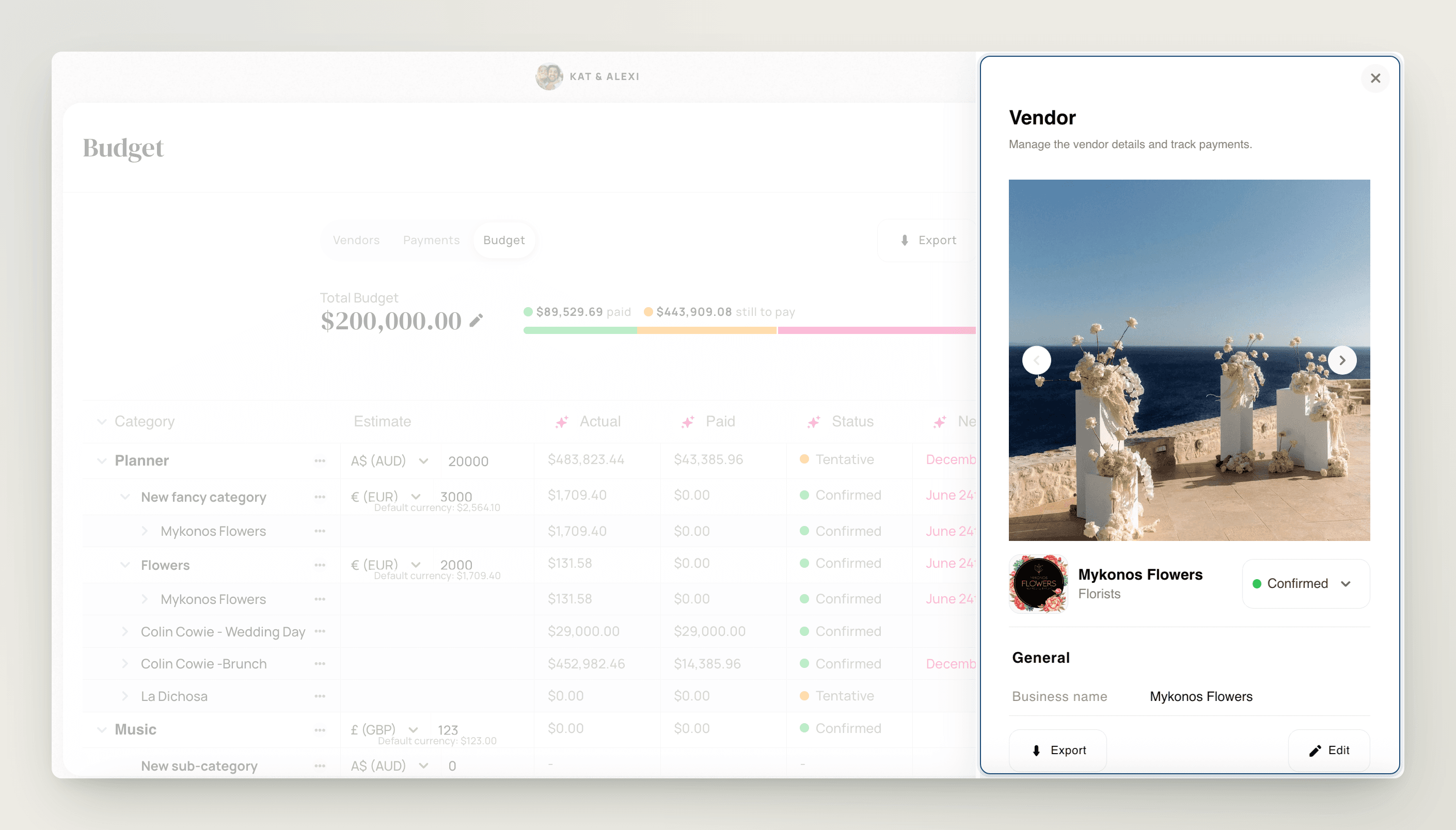
Add a vendor to the budget and their payment schedule comes with them — every deposit, instalment, and final payment sits in the right category, and the totals add up on their own.

Add a vendor to the budget and their payment schedule comes with them — every deposit, instalment, and final payment sits in the right category, and the totals add up on their own.

Add vendors without leaving the budget

Add vendors without leaving the budget

Pull in an existing vendor or create a new one right from the budget screen, and nest it under any category or sub-category.

Pull in an existing vendor or create a new one right from the budget screen, and nest it under any category or sub-category.

One-off costs still count

One-off costs still count

Log a payment with no vendor at all — stamps, tips, permits — and point it at a budget category so miscellaneous spend never disappears from your totals.

Log a payment with no vendor at all — stamps, tips, permits — and point it at a budget category so miscellaneous spend never disappears from your totals.

Your categories, your structure

Your categories, your structure

Build your own

Build your own

Create budget categories and sub-categories that match how you actually plan — not a fixed list someone else designed. Rename, reorganise, or remove them any time.

Create budget categories and sub-categories that match how you actually plan — not a fixed list someone else designed. Rename, reorganise, or remove them any time.

Vendors follow your structure

Vendors follow your structure

Nest vendors under sub-categories for line-level tracking, and use ‘Move to…’ to reassign a vendor — every payment, due date, and cost carries over automatically.

Nest vendors under sub-categories for line-level tracking, and use ‘Move to…’ to reassign a vendor — every payment, due date, and cost carries over automatically.

Built because you asked

Built because you asked

Custom categories were the most-requested budget feature — they shipped in the June 2026 budget rebuild, alongside a remaining-budget view in your totals.

Custom categories were the most-requested budget feature — they shipped in the June 2026 budget rebuild, alongside a remaining-budget view in your totals.

Multi-currency budgets for destination weddings

Multi-currency budgets for destination weddings

Your rates, not the bank’s

Add the currencies you work in and set your own exchange rate for each — the rate you actually agreed, not today’s spot price.

One home-currency overview

Flip the budget dashboard into any currency you’ve added and every conversion and total updates automatically — pay the villa in euros and the photographer in pounds, and still see one honest number.

Built for planners who cross borders

Track a GBP client spending in USD, or a five-currency destination wedding, without a conversion spreadsheet on the side.

Itemise every vendor cost into services and fees

Itemise every vendor cost into services and fees

Line items, not lump sums

Break any vendor’s cost into individual services and fees — food, staffing, delivery, service charges — each with per-unit or flat pricing, its own currency, and its own budget category.

Subtotals do the maths

TTO calculates each vendor’s subtotal from its line items and reflects it in the overall budget automatically.

Template it once, reuse it everywhere

Save a templated vendor in Contacts with services and fees pre-filled, then pull it into any event — your caterer’s price list types itself.

Connected to payments, end to end

Connected to payments, end to end

Tick paid, budget updates

Every payment you enter or mark as paid updates the budget automatically — no extra work, no formulas. Outstanding is always actual minus paid.

See what’s due before it’s late

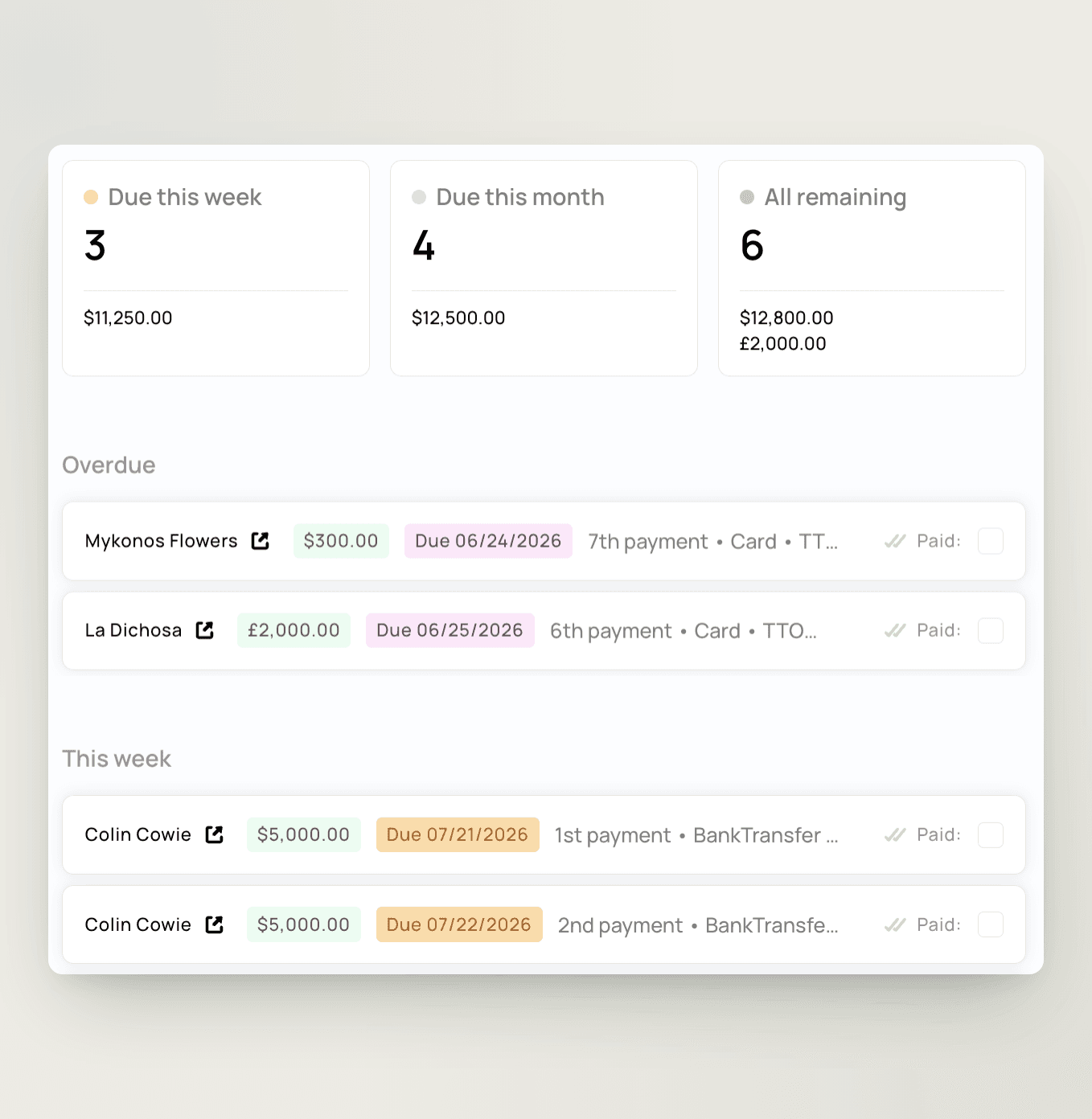
The payments view groups everything by month with three running cards — due this week, due this month, and all remaining — across deposits and final payments alike.

Reminders that chase for you

Clients get a weekly email summarising their upcoming payments; you get one weekly email covering upcoming payments across all your events. The wedding expense tracker that does its own follow-up.
Estimated vs actual, without the formulas

Estimated vs actual, without the formulas

Set the goal first

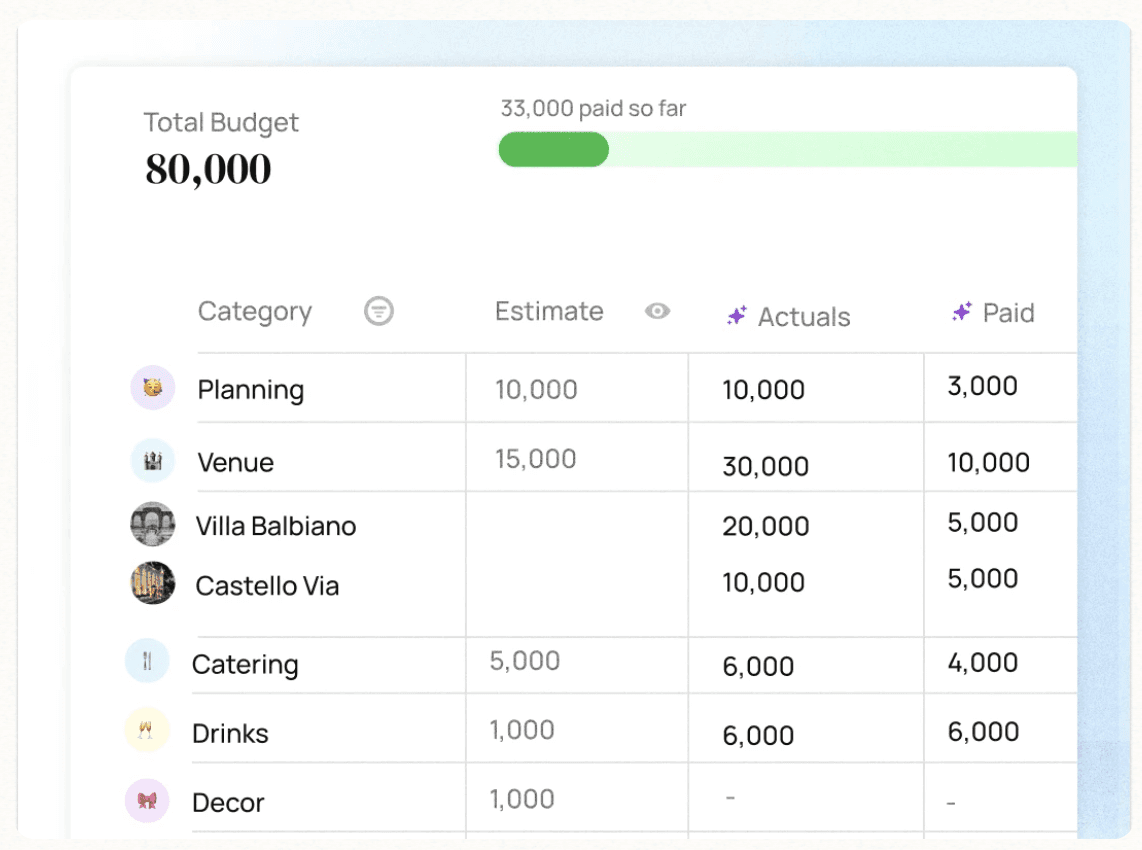
Give each event an overall budget goal, then watch how actual costs compare as planning progresses — expectation-setting built into the tool.

Planned vs spent at every stage

Budget entries hold what you expect to spend; payments capture what actually left the account. The two sit side by side, always current, with remaining budget in your totals.

Show clients a budget they can read

Share a clear, structured budget that’s easy to understand and always up to date — the trust-builder that spreadsheet screenshots never were.


“I’m a wedding planner, not a travel agent! This takes a huge weight off my shoulders.”

Holly, Wonderlust Events

“I’m a wedding planner, not a travel agent! This takes a huge weight off my shoulders.”

Holly,
Wonderlust Events

4 pasos simples para un alojamiento fácil

4 pasos simples para un alojamiento fácil

4 pasos simples para un alojamiento fácil

Facilitamos la seguridad de alojamiento y aún más fácil para los huéspedes elegir y pagar por las habitaciones

Facilitamos la seguridad de alojamiento y aún más fácil para los huéspedes elegir y pagar por las habitaciones

Set and structure your client’s budget

Define the overall budget, organise categories, and set clear expectations from the start

Add vendors and track estimated costs

Keep all expected spend in one place, linked directly to your vendors, their services, and payment schedules

Monitor spend and manage payments

Track deposits, update actual costs, and keep your client informed with a clear, real-time overview


elige entre más de 1,7 millones de hoteles y alojamientos boutique en todo el mundo

elige entre más de 1,7 millones de hoteles y alojamientos boutique en todo el mundo

Frequently asked questions

Frequently asked questions

Is the budget tied to vendors, or can I build my own categories?

You're in control. Build your own categories and sub-categories, rename or reorganise them any time, and plan spend independently of any vendor. Custom categories were our most-requested feature — they shipped in the June 2026 budget rebuild.

Can I break a vendor cost into individual services and fees?

Yes. Itemise any vendor cost into separate services and fees with per-unit or flat pricing, and TTO calculates the subtotals and reflects them in your overall budget automatically.

Which currencies does the budget support?

TTO supports multi-currency budgeting across 17 currencies, each with editable exchange rates, while keeping a running overview in your home currency.

Can I track payments and what's still outstanding?

Yes. Record payment amounts and dates against each vendor, tick them off as paid, and the budget updates automatically — outstanding is always what's actual minus what's paid.

Can I track two currencies at the same time?

Yes. Add both currencies in Budget Settings with your own exchange rates, then switch the budget dashboard between them — conversions and totals update automatically.

Do my vendors' payment schedules show up in the budget?

Yes. When you add a vendor to the budget, their payment schedule connects to your categories and sub-categories, so every deposit and final payment lands in the right place and the totals add up.

Can I set a predicted cost and compare it against actuals?

Yes. Budget entries hold your estimated costs, payments capture actual spend, and an overall budget goal shows how the two compare as planning progresses.

Can I reuse a budget setup across weddings?

Yes. Save templated vendors in your Contacts with services and fees pre-filled, then pull them into any new event — no re-entering your caterer's price list every time.

Can I log an expense that isn't tied to a vendor?

Yes. Record a payment without a vendor and point it at any budget category, so one-off costs like tips or permits still show in your totals.

Does TTO remind clients about upcoming payments?

Yes. Clients receive a weekly email summarising upcoming payments, and you get one weekly email covering upcoming payments across all your events. Reminders can be turned off in Settings.

Is there a wedding budget app?

TTO runs in the browser — nothing to install for you, your team, or your clients. Manage every client budget from one login and check what's due from anywhere.

Can I use it for events other than weddings?

Yes. The same budget software handles corporate events, birthdays, quinceañeras, and multi-day celebrations — any event with vendors, categories, and payment schedules.

Alojamiento para huéspedes facilitado 🖤

Estamos registrados como empresa en Inglaterra y Gales, número de empresa 12816943

Con cariño de Paddington, Londres